Skip to content

GitHub deployment monitoring

Track what happens after your GitHub Actions releases reach production

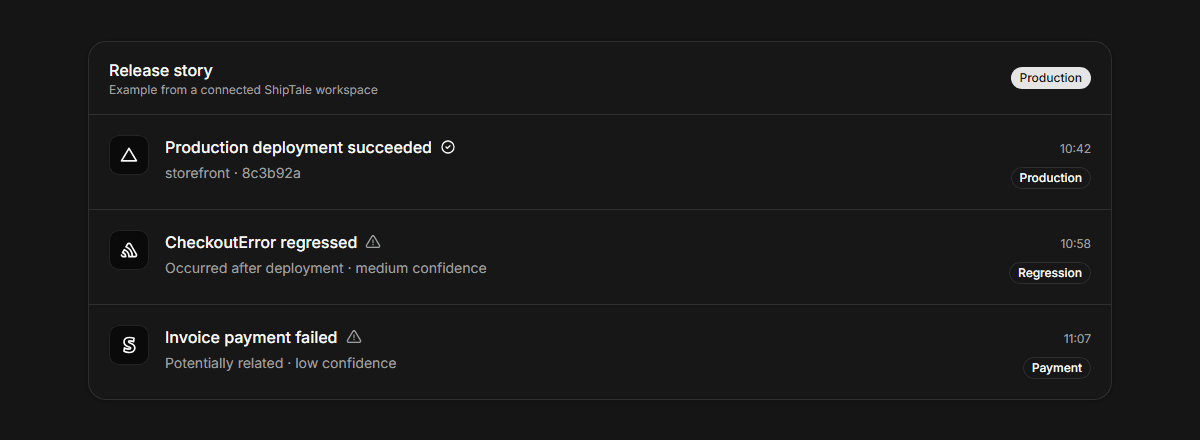
GitHub Actions automates code delivery, but visibility often stops once the workflow succeeds. ShipTale links each successful GitHub production release with subsequent operational signals—such as Sentry error spikes, PostHog trend shifts, and Stripe subscription changes—so engineering teams can understand the real-world impact of their pull requests.

Last reviewed:

ShipTale release timeline tracing operational signals following a GitHub deployment
Provider context stays traceable to its source and qualified by the available evidence.

Why monitor beyond GitHub workflow completion?

A green checkmark in GitHub Actions proves the code built and deployed, but it does not tell you if checkout rates dropped or error spikes began 15 minutes later. ShipTale keeps watching after production.

How PR and commit context accelerates root-cause analysis

When Sentry spots an error spike after a release, ShipTale immediately links the release's commit message, SHA, and pull request title, allowing on-call engineers to identify suspect changes without context switching.

What ShipTale supports—and where it stops

AreaSupportsDoes not claim or do
Release triggersGitHub production deployments or specific Actions workflow runsPull request previews or test pipeline runs
Correlated signalsSentry error spikes, PostHog 1h/24h measurements, and Stripe chargesThird-party synthetic uptime pings
Evidence modelTraceable commit, resource, and time-window associationsUnexplained AI guesses or automated rollbacks

How the workflow runs

  1. 01

    Connect your GitHub repository

    Authorize read access via fine-grained token and pick your release workflow anchor.

  2. 02

    Link quality and analytics providers

    Add Sentry for error spikes and PostHog for conversion measurements.

  3. 03

    Read unified release stories

    See the full narrative of what was deployed and how the system behaved afterwards.

Provider documentation

These primary sources describe provider capabilities. ShipTale behavior is described separately above.

Frequently asked questions

How does ShipTale know which PR was deployed?
When a GitHub deployment or workflow completes, ShipTale queries the associated commit and extracts the merged pull request title, number, and author to display directly on the release Tale.
Can I use GitHub alongside Vercel?
Yes. You can use GitHub for commit and PR context while using Vercel or GitHub as your release anchor.

Continue exploring

Start your first Tale

Connect Vercel and Sentry free. Add Stripe customer context on Pro.

Start free